


Free CRM for Messenger-Based Sales: How to Track Leads From Telegram, WhatsApp and Instagram
Competition is growing, customers are more demanding, and internal processes are becoming more complex. That is why queries like “free CRM for small business” and “free CRM for SMB” keep rising in search popularity. Entrepreneurs and marketers want to manage their customer base, control deals, avoid losing leads, and see analytics — but without committing to expensive enterprise tools from day one.
In this article, we will walk through what a free CRM for small and medium businesses really needs to do, which limitations to expect from free plans, and how Mavibot CRM helps you build a modern sales and communication system with minimal risk.
What a Free CRM for SMB Really Needs to Do
A CRM for a small or medium business is not just a place to store contacts. In practice, companies need a system that helps them:
- Store and structure the entire customer base in one place instead of scattered spreadsheets and chats.
- Track the full sales pipeline from the first contact to payment.
- Avoid losing leads due to manual processing and missed messages.
- Analyze performance at each funnel stage and understand how the team is doing.
For small and medium businesses, it is also crucial that a free CRM plan allows you to:
- Start without large upfront investments or long contracts.
- Test key scenarios on real leads before upgrading.
- Build at least one working sales funnel and understand which features you actually need as you grow.
This is exactly the approach taken by Mavibot CRM — a free CRM for small and medium businesses built around messengers, automation, and chatbots.

Free CRM Limitations: What You Should Expect
Any free CRM, even a very strong one, will have some limitations. Understanding them upfront helps avoid disappointment
- Limits on the number of users or team seats.
- Limits on the number of contacts or deals you can store.
- Restricted access to certain integrations and advanced automation features.
The goal of a smart free plan is not to lock you in, but to let you:
- Set up real working processes on actual deals.
- See whether the system fits your business model.
- Move to extended features when that upgrade is really justified.
Mavibot CRM follows this philosophy with a free starter plan that covers the core needs of SMBs and can be expanded as the business grows.
Generic CRM vs CRM Built for Messengers and Chatbots
Most generic CRMs were originally designed around email and phone calls. However, many small and medium businesses today get a significant part of their leads from messengers and social media.
A CRM optimized for messengers and chatbots provides several important advantages:
- Faster lead capture: incoming requests from Telegram, Instagram, TikTok, and WhatsApp are automatically converted into CRM leads.
- Shorter response times: managers reply where customers already communicate, without switching between multiple apps.
- More automation potential: chatbots can qualify leads, answer FAQs, and warm up prospects before a human gets involved.
Mavibot CRM was built with this reality in mind, tightly connecting CRM, messengers, and chatbots in a single environment.
Mavibot CRM: A Modern Free CRM for Small and Medium Businesses
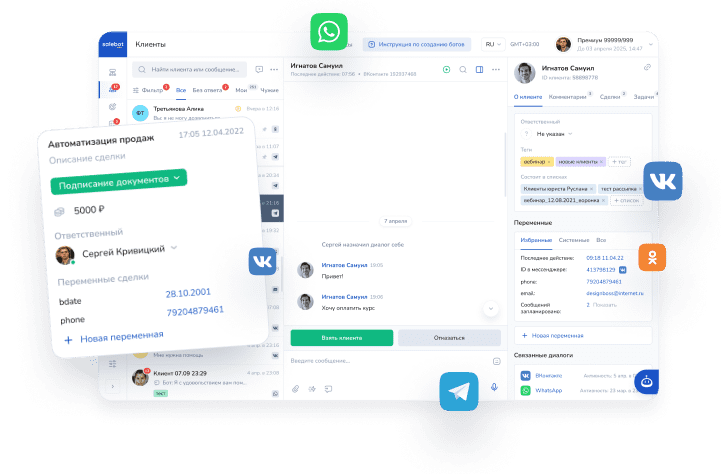
Mavibot CRM is much more than a spreadsheet with contacts. It is a comprehensive platform that combines:
- A full-featured CRM system with customer cards, deals, and stages.
- Built-in chatbots for lead generation and customer support.
- Integrations with popular messengers and social networks.
- Analytics and reporting for owners and managers.
The system is designed for online businesses, info-products, service companies, experts, online schools, and small enterprises that actively use social media and messengers to communicate with customers. The key advantage is that you can build an automated customer management and sales process without an in-house IT team or long implementation projects.

Core Features of Mavibot CRM
1. Customer Database Management
Mavibot CRM helps create a single, structured customer base instead of fragmented spreadsheets and chats.
- Centralized storage of contacts and leads in CRM cards.
- Segmentation by tags, funnels, channels, and activity.
- Full communication history in one place — messages, notes, and deal status.
- Filtering by funnel stage, responsible manager, source, and other parameters.
This gives you a clear view of who your customers are, where they came from, and what has already been discussed with them.
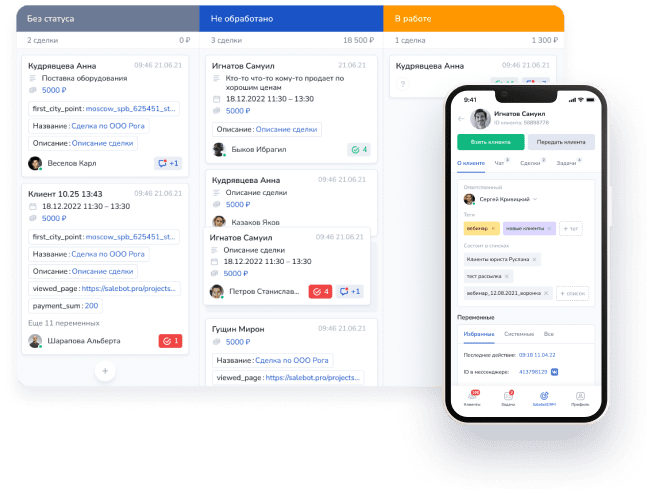
2. Sales Automation and Pipelines
For small and medium teams, a CRM must not only collect data but also remove routine work. Mavibot CRM lets you:
- Build custom sales funnels that reflect your real process.
- Automatically move leads between stages based on triggers and events.
- Set up automated messages in messengers depending on customer behavior.
- Create reminders and tasks so managers do not forget to follow up.
As a result, the team spends less time on mechanics and more on actual communication and deal closing.
3. Messenger and Social Media Integrations
Modern customers prefer to communicate where they already spend their time. Mavibot CRM supports key channels:
- Telegram
- TikTok
Incoming messages and requests are synchronized with the CRM, so you can process leads directly from the channels where they originate, while keeping all data structured and ready for analytics.
4. Built-In Chatbots
One of Mavibot CRM’s core strengths is its integrated chatbot builder. Chatbots help you:
- Automatically collect and qualify leads from messengers and social media.
- Answer common questions 24/7 without overloading managers.
- Warm up prospects with scripts and content before handing them off to a human agent.
This means managers get more prepared and informed customers, while the cost of processing initial inquiries goes down.

5. Analytics and Reporting
Without analytics, a CRM turns into a simple address book. Mavibot CRM provides:
- Statistics on the number of leads for selected periods.
- Conversion rates at each stage of the funnel.
- Distribution of deals by source, channel, and responsible person.
- Performance metrics for managers and teams.
These reports allow you to make data-driven decisions instead of relying on guesswork.
What to Look For in a Free CRM for Small Business
Below is a practical overview of what matters in a free CRM for small businesses, and how Mavibot CRM addresses these aspects.
| Feature | Why it matters for SMB | How Mavibot CRM covers it |
|---|---|---|
| Contact & deal management | Keeps all leads and customers organized instead of scattered spreadsheets | Full CRM with customer cards, deals, and stages in one system. |
| Sales pipeline configuration | Reflects your real process and shows where deals get stuck | Customizable funnels with flexible stages and triggers. |
| Messenger & social media integrations | Lets you work where your customers actually contact you | Integrations with Telegram, Instagram, TikTok, WhatsApp. |
| Chatbots | Automates routine FAQ and lead qualification, saves manager time | Built-in chatbots connected directly to CRM data. |
| Automation & reminders | Reduces human error and missed follow-ups | Automated messages, tasks, and reminders. |
| Analytics & reporting | Shows which channels work and how the team performs | |
| Free plan with growth path | Allows you to start small and upgrade when needed | Free entry plan plus the option to expand limits and features later. |
Real-Life Scenarios: How a Free CRM Changes the Game
Online School or Educational Project
- Leads come from Instagram and TikTok ads or organic content.
- A Telegram chatbot collects contact details and course interest.
- Data flows into Mavibot CRM, where managers track deals and send reminders about webinars and enrollment deadlines.
Result: fewer lost leads, higher conversion from interest to payment, and clear statistics on which campaigns perform best.
Service Business (Beauty, Clinics, Auto Services)
- Customers send messages via WhatsApp or Instagram to ask about prices and available time slots.
- A chatbot helps pre-qualify the request and offers time options, while managers confirm bookings through the CRM.
- The system sends reminders before the visit and follow-ups after, encouraging repeat visits.
Result: fewer no-shows, more repeat customers, and a structured base for future promotions.
Marketing Agency or Small Sales Team
- Leads come from ads, website forms, and social media DMs.
- All new inquiries go into Mavibot CRM and are distributed among managers.
- The agency tracks which channels generate more qualified leads and which scripts or chatbots convert better.
Result: a transparent pipeline, better forecasting, and the ability to clearly prove results to clients.
If your process looks similar to any of these, you can quickly recreate it in Mavibot CRM using the free plan and basic automation.
Who Will Benefit Most from Mavibot CRM
Mavibot CRM is particularly relevant for:
- Online schools and educational projects.
- Experts, coaches, and consultants.
- Digital marketers and small agencies.
- E-commerce and niche online stores.
- Service businesses (beauty, medicine, auto services, repairs, etc.).
- Small and medium companies working primarily through messengers and social networks.
If most of your leads come from Telegram, Instagram, TikTok, or WhatsApp, a free CRM for small business like Mavibot will be much more convenient than a traditional email-only system.
Advantages of Mavibot CRM for Growing SMBs
For small and medium businesses, it is important that a CRM is simple at the beginning but does not become a bottleneck later. Mavibot CRM offers:
- A user-friendly interface that does not require long training.
- The ability to start with a basic funnel and add automation and channels as you grow.
- A free starter plan that lets you launch without financial risk.
- Active product development and regular updates based on customer feedback.
- Mobile apps so owners and managers can work with leads and deals on the go.
You can start small, but you do not hit a ceiling as soon as the business begins to scale.
How to Start Using Mavibot CRM: Step by Step
Getting started with Mavibot CRM does not require a complex implementation.
- Register on the Mavibot platform.
- Set up your sales funnel stages according to your real process (for example: New lead → Contacted → Proposal sent → Payment).
- Connect messengers so that incoming leads automatically appear in the CRM.
- Add team members and assign responsibility for leads and deals.
- Configure basic automation: welcome messages, simple follow-ups, and reminders.
Within the first day, you can have a working free CRM for your SMB processes and see where further optimization is needed.
FAQ — Free CRM for Small and Medium Businesses and Mavibot CRM
1. Is Mavibot CRM really free?
Yes. There is a free plan that lets you start working with the CRM, test key scenarios, and see whether it fits your business. If you need higher limits or advanced features, you can upgrade later.
2. Which is the best free CRM for small business?
There is no single “best” CRM for everyone. For companies that actively use messengers and social media, a solution like Mavibot CRM, which combines CRM, chatbots, and channel integrations, often provides more value than generic, email-focused systems.
3. Is it suitable for offline businesses?
Yes. If you collect leads, keep a customer base, and manage repeat sales, a CRM will help structure and automate these processes regardless of whether you sell online or offline.
4. Is Mavibot CRM difficult to implement?
No. The interface is intuitive, and basic setup can be done independently without developers. You can start with a simple funnel and add more complex automation as you gain experience.
5. Can it be connected to advertising channels?
Yes. Mavibot CRM can be integrated with traffic sources so that leads from campaigns automatically go into the system and are processed by managers or chatbots.
6. Is it suitable for teams?
Yes. You can add team members, assign deals and tasks, and configure access permissions. This is convenient for sales departments, call centers, agencies, and distributed teams.uaeads+1
7. Can repeat sales and follow-ups be automated?
Yes. Mavibot CRM supports automated messages, reminders, and follow-up sequences that help bring customers back, increase LTV, and build long-term relationships.
8. How to migrate from spreadsheets to CRM?
You can gradually move data from spreadsheets into Mavibot CRM, starting with active leads and current customers. Then you can build funnels and automation around them while keeping old spreadsheets as a backup.
Ready to Try Mavibot CRM on the Maximum Plan?
You do not have to guess whether this free CRM for small and medium businesses fits your processes — you can test it with the full feature set.
Sign up on the Mavibot platform and enter the promo code mavi10 when creating your workspace — it gives you 10 days of access to the maximum plan, so you can test all key features of the system without limits during this period.
Within these 10 days you will be able to:
- Import or manually add your first leads and customers.
- Build one or several sales pipelines tailored to your real processes.
- Connect Telegram, WhatsApp, Instagram, TikTok and see how leads flow directly into the CRM.
- Test chatbot workflows in messengers, auto-reply scenarios, and follow-up sequences.
- Evaluate analytics and reports to see which channels and scripts generate more leads and sales.
Important: the core CRM features and basic client management are available on the free plan, but for full-scale and truly effective work with bots in messengers (richer scenarios, higher limits, advanced automation) you will need a paid plan. The trial period with the promo code is there to let you calmly test these capabilities and understand whether they pay off in your case.
After the trial ends, you can stay on the free plan for basic CRM usage or switch to a paid one if you want to continue using chatbots and advanced automation — all data and settings you create will remain in your account.
Register, enter the promo code mavi10, and see how a CRM built specifically for messengers and bots can streamline your sales and client communication without extra effort.